Screen Click Scratch Life Tester
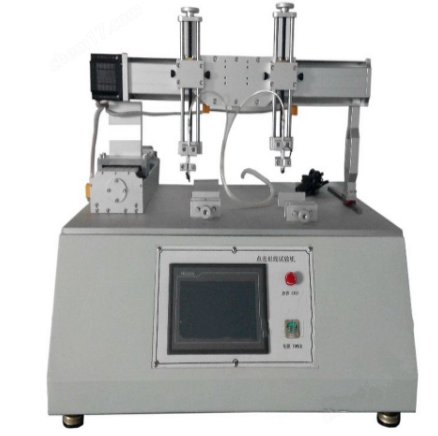


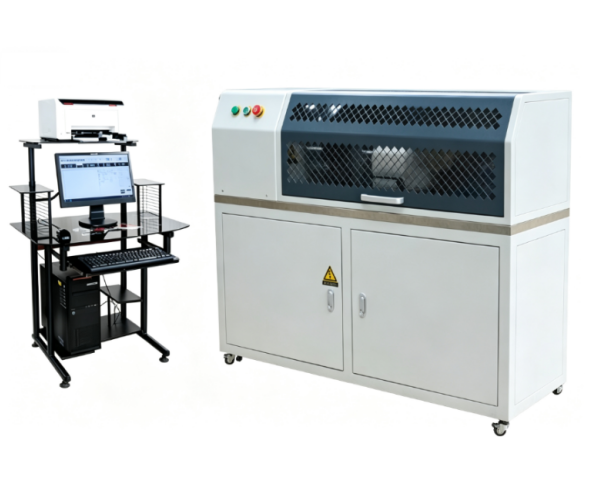
Screen Click Scratch Life Tester is used to evaluate the durability of touchscreens under repeated clicking and scratching actions during long-term use. The device applies repeated clicking or scratching motions to the touchscreen surface under controlled pressure, speed, and trajectory conditions to assess the surface's resistance to damage and functional integrity.
Application
This equipment is suitable for the following products and testing scenarios:
- Click endurance testing of touchscreens for mobile phones and portable electronic devices
- Scratch durability assessment of capacitive touchscreens
- Reliability verification during the R&D phase of touch display modules
- Life sampling inspection of finished touchscreens after mass production
- Functional verification of OLED and other display devices following mechanical endurance testing
Applicable to touchscreen manufacturers, display module factories, and related testing laboratories.
Standards
GB/T 4208-2017 “Degrees of Protection Provided by Enclosures (IP Code)”
SJ/T 11342-2015 “General Specifications for Touch Screens”
SJ/T 11467-2014 “General Specifications for Capacitive Touch Screens”
ISO 6508 / ISO 14577 Surface Hardness and Micro-Damage Supplementary Assessment
IEC 62341 (OLED Series) Display Device Reliability Assessment Reference
IEC 60068-2 Series Functional Verification After Environmental and Mechanical Stress Testing
Parameters
| Item | Technical Parameter |
|---|---|
| Test Station | 2 Stations |
| Moving Distance | X-axis: 800 mm; Y-axis: 400 mm |
| Moving Speed | 0–300 mm/s |
| Drawing Trajectory | Rectangle, Triangle, Straight Line, Diagonal, etc. |
| Counting Method | 6-digit counting, with power-off memory function |
| Control Method | PLC control, touch screen operation |
| Loading Method | Cylinder loading |
| Loading Force Range | 100–500 gf, adjustable |
| Standard Weights | 50 g, 100 g, 200 g, 2 pieces each |
| Maximum Friction Force | 5 N |
| Friction Force Resolution | 500 mN |
| Motor Torque | 1.3 N·m |
| Equipment Dimensions | W950 × D650 × H510 |
| Equipment Weight | 55 kg |
| Power Supply | AC 220 V / 3 A |
| Equipment Type | Friction and Wear Testing Equipment |
Features
- Utilizes a PLC control system for stable operation and intuitive parameter settings
- Supports both click and line-drawing modes for lifespan testing
- Features cumulative test count tracking and power-off memory function
- Adjustable click and line-drawing pressure to accommodate diverse screen testing requirements
- Supports multiple motion trajectories to simulate real-world usage conditions
- Automatically shuts down upon reaching the preset lifespan count, minimizing human intervention
Accessories
| Name | Description |
|---|---|
| Click/Scratch Stylus | Rubber stylus equivalent to a stylus pen |
| Cylinder Assembly | Used for applying click and scratch pressure |
| Standard Weights | 50 g, 100 g, 200 g |
| Sample Fixing Fixture | For touch screen sample installation |
| Control System | PLC control unit and touch screen |
Test Principle
During testing, a cylinder-driven probe applies a set normal load to the touchscreen surface, performing periodic tapping or scribing movements along a predetermined trajectory.
By controlling test cycles, applied pressure, and movement speed, the probe evaluates surface scratch conditions and functional responsiveness after a specified lifespan cycle. This determines the touchscreen's resistance to tapping, scratching, and overall service life.
Test Procedures
Mount and secure the touchscreen sample onto the test platform.
Install the click or scratch probe and set the loading force.
Configure the movement trajectory, speed, and target lifespan cycles.
Initiate the test; the device will operate automatically per the programmed sequence.
The device will automatically stop upon reaching the preset cycle count.
Remove the sample and inspect the surface for scratches and functional responsiveness.
FAQ
1. What types of touchscreens can you test with this equipment?
You can test capacitive touchscreens, OLED displays, and other flat panel touch interfaces used in consumer electronics, automotive systems, and industrial devices.
2. Can you perform both click and scratch tests on the same sample?
Yes. The tester supports both clicking and line-drawing scratch modes, allowing sequential or independent durability evaluation.
3. How do you ensure consistent test pressure during long-term testing?
The cylinder loading system combined with calibrated standard weights maintains stable and repeatable normal force throughout the test.
4. What happens if there is a power interruption during testing?
The built-in power-off memory function preserves the test count, allowing you to resume testing without losing accumulated data.
5. How do you evaluate test results after completion?
You assess surface wear, scratch depth, visual defects, and touchscreen functional responsiveness according to your internal quality or standard requirements.
6. Is the tester suitable for mass production quality control?
Yes. Its stable operation, automated control, and repeatability make it suitable for both R&D validation and routine production sampling inspections.
Leave Message Get Price